Taskbar customizer tool for Windows
RoundedTB is a free personalization program created by indie developer TorchGM. With this Windows utility, users of PCs running Microsoft's latest Windows 11 operating system can customize the look of their taskbar in various ways. All its options can be easily configured through a simple and intuitive user interface.
Top Recommended Alternative
Much like TaskbarX or RocketDock, RoundedTB lets users personalize their desktop home screen, the taskbar in its case, to suit their preference. It also provided some handy extra features to help improve the overall user experience and add a bit more functionality and information that they can see at a glance.
Taskbar modding
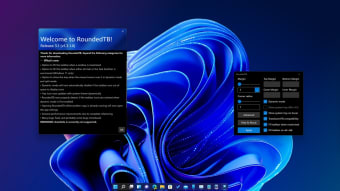
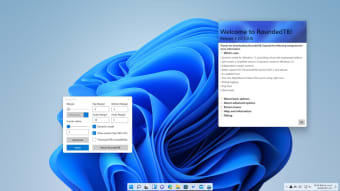
Whether you're using the installable or portable version, RoundedTB is a straightforward tool to use. On its main screen, you can adjust your taskbar's margins and corner radius right away. For the former, you can set any value you want for the top, bottom, left, and right sides. When it comes to the latter, there's an adjustment slider to set how rounded or sharp the corners will be.
There's also a feature called Dynamic Mode and it basically divides your program shortcuts and system tray to have their own dock. Tap the advanced settings for even more options, such as the ability to adjust margins independently and show or hide your system tray. There are also what's called fill taskbar options, which expand your taskbar to its full length in certain conditions for a more seamless look.
Lastly, there are some bonus extras you can optionally enable with the first being compatibility with the TranslucentTB tool. The other is for Windows 10 users that aim to replicate the separate dock effect with Split Mode. While on the subject, Dynamic Mode still has plenty of bugs to fix like failing to apply changes, inconsistent auto-hide functions, and other small visual glitches.
A more personalized look
In conclusion, RoundedTB is pretty much a must-have for any Windows 11 user with all the customization options it provides. With it, you'll be able to change the look of your taskbar in all kinds of ways quite easily. The bonus Split Mode will also be appreciated by many who are still using Windows 10. Some issues aside, you should definitely try this one out. Highly recommended.